
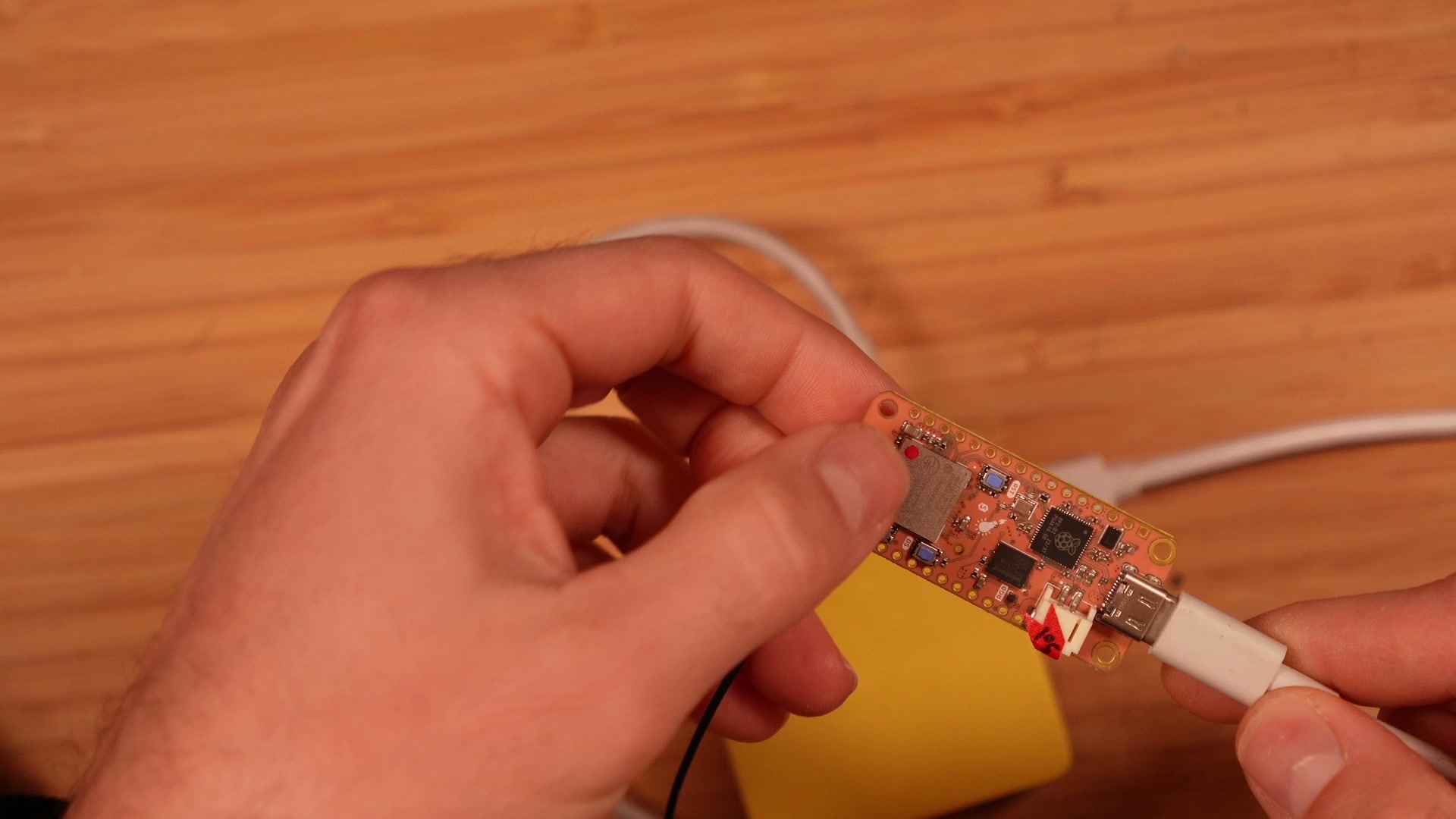
Turning a travel router into an LTE-M gateway with the nRF9151 Feather
The nRF9151 is usually the whole application: it opens its own sockets, talks CoAP or MQTT, and sleeps in between. That’s what it’s built for. But I’ve always wanted to try the opposite: let the nRF9151 provide an internet connection to another Linux device, and let that device do the heavy lifting.
So that’s what this project does. A GL.iNet GL-MT300N-V2, a tiny travel router, runs stock OpenWrt 25.12.5 with a handful of extra packages. An nRF9151 Feather plugs into its USB port. That’s it. The router gets a wwan interface over LTE-M, and anything on its Wi-Fi or LAN gets online through it. In the video, my laptop is connected to it over Wi-Fi.
It isn’t fast; it’s not your phone. But it’s plenty for backup connectivity and for embedded gateways. And it opens the door to the thing I actually want: an OpenThread Border Router with a cellular uplink. Border routers need NAT, routing and enough memory to track lots of connections, so they want a Linux box. OpenWrt is where that ecosystem is heading anyway, and you can install the border router as just another package.
How it fits together
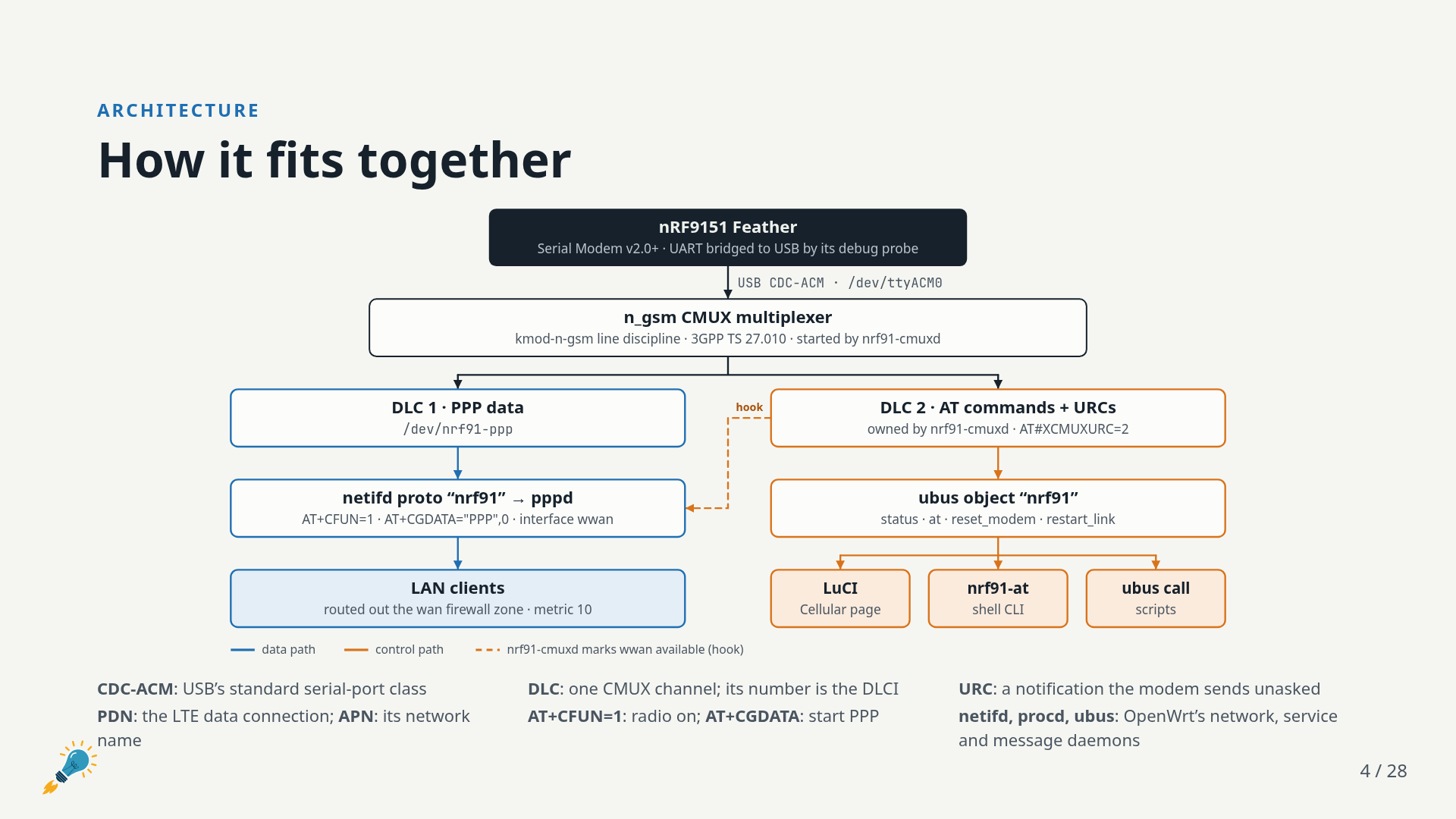
Everything happens over a single USB serial port. The Feather’s on-board debug probe bridges USB to the nRF9151’s UART, so the router sees the modem as /dev/ttyACM0. The nRF9151 runs Nordic’s Serial Modem application, built with its PPP and CMUX configurations.
There are five OpenWrt packages:
| Package | What it does |
|---|---|
kmod-n-gsm | The CMUX multiplexer, as a kernel module. The release kernel ships without it, so it’s built out of tree, plus one fix (more on that below). |
nrf91-gateway | nrf91-cmuxd, the daemon that brings the link up and keeps it alive, plus the nrf91 netifd protocol and an nrf91-at CLI. About 2,800 lines of C. |
nrf91-mwan3 | A default mwan3 policy to fail over from wired WAN to cellular. |
luci-proto-nrf91 | APN and PDP settings under Network → Interfaces. |
luci-app-nrf91 | A Network → Cellular page with modem, network and signal status. |
Why multiplex?
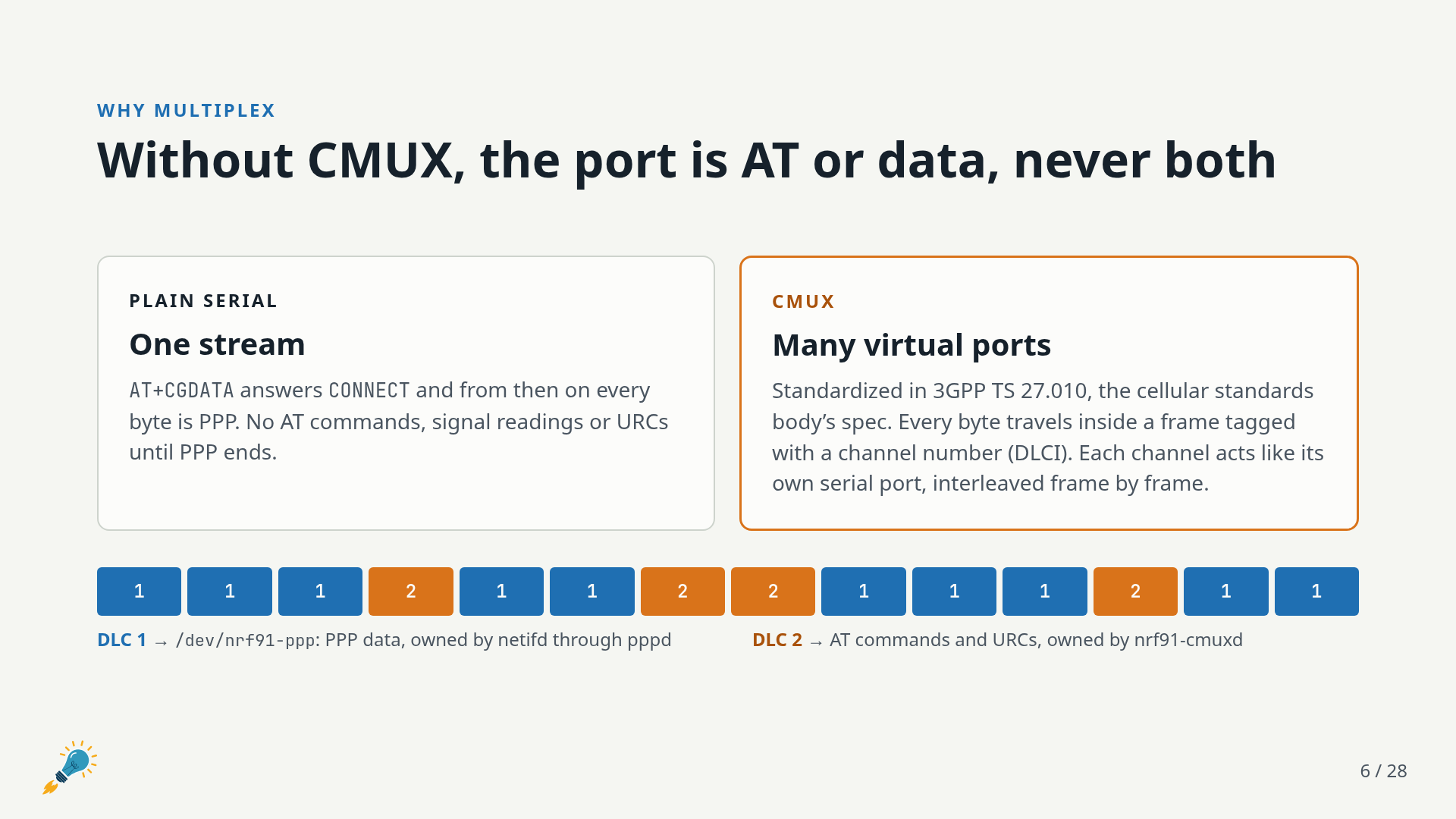
A plain serial modem link has a problem: once you send AT+CGDATA and the modem answers CONNECT, every byte from then on is PPP. No more AT commands, no signal readings, no registration notifications until the data session ends. For a gateway that’s bad. You want to see what the modem is doing while it’s moving traffic.
CMUX (3GPP TS 27.010) fixes this. Every byte travels inside a frame tagged with a channel number, so one physical port carries several virtual serial ports, interleaved frame by frame. This gateway uses two:
- DLC 1: PPP data, which shows up on the router as
/dev/nrf91-pppand is owned by pppd through netifd - DLC 2: AT commands and URCs, owned by
nrf91-cmuxd
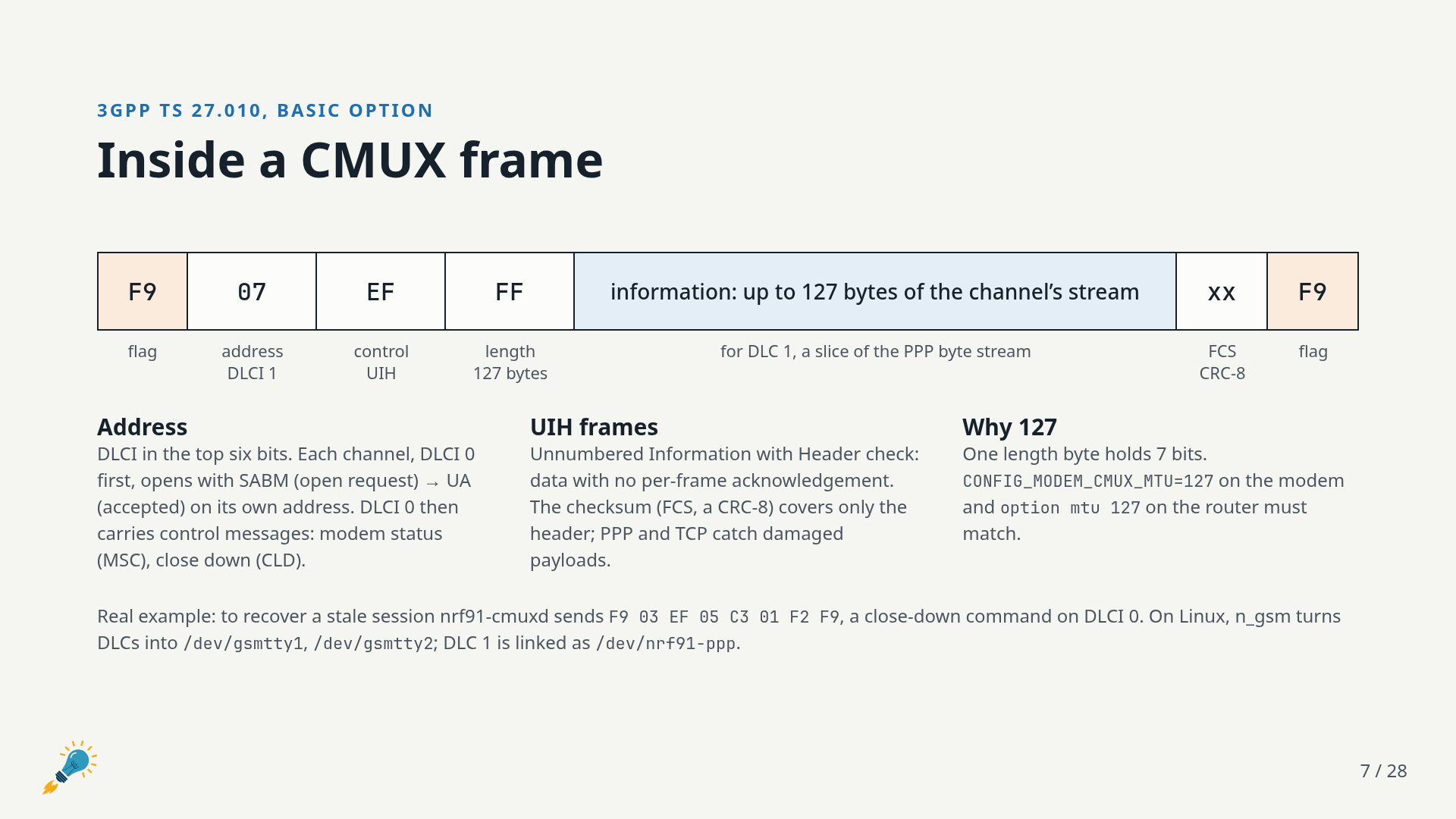
I find this layering kind of fun. It’s wrapping a present inside a present: UART bits carry CMUX frames, CMUX frames carry PPP frames, PPP frames carry IP packets. Each side unwraps its layer and hands the rest up the stack.
One detail worth calling out: the CMUX frame size has to match on both ends. The modem’s CONFIG_MODEM_CMUX_MTU=127 and the router’s option mtu 127 must agree, since each side has to accept the other’s largest frame. 127 is the largest payload that still fits in a one-byte length field.
The nRF9151 is just a pipe
This was the part that clicked for me. In PPP mode, the Serial Modem keeps no session state. It demuxes CMUX, sends AT commands to the modem, and forwards packets between PPP and the LTE data connection. That’s all.
The router takes over the nRF9151’s IP address and builds packets as if it were the modem. All the TCP state, the NAT table and every client connection live on the router, which has far more memory than the nRF9151 does. The complexity is still there, but it lives somewhere that can handle it.
The flip side is that a change of address breaks open connections. A modem reset or a failover means a new public IP, and applications have to reconnect.
nrf91-cmuxd: setting up, tearing down, starting over
The kernel module (n_gsm) only moves bytes. It builds and parses frames and exposes each channel as a tty. It knows nothing about AT commands, PPP or the modem. Everything else is nrf91-cmuxd’s job:
- Find the modem on the serial port, at the boot baud rate or the faster
AT+IPRrate if one is set - Close any CMUX session left over from before
- Send
AT#XCMUXURC=2andAT+CMUX=0to put the modem in CMUX mode - Attach the n_gsm line discipline and open both channels
- Hand DLC 1 to pppd and keep DLC 2 for itself
From then on it’s a watchdog. Every 30 seconds it sends a health check (“are you there?”) and polls registration, operator, band and signal (RSRP, RSRQ, SNR). If the link drops, the modem resets, or three health checks fail in a row, the daemon exits and procd starts the whole link over from scratch. Every link start forgets everything about the previous one. The modem holds no sessions, so there’s nothing to restore.
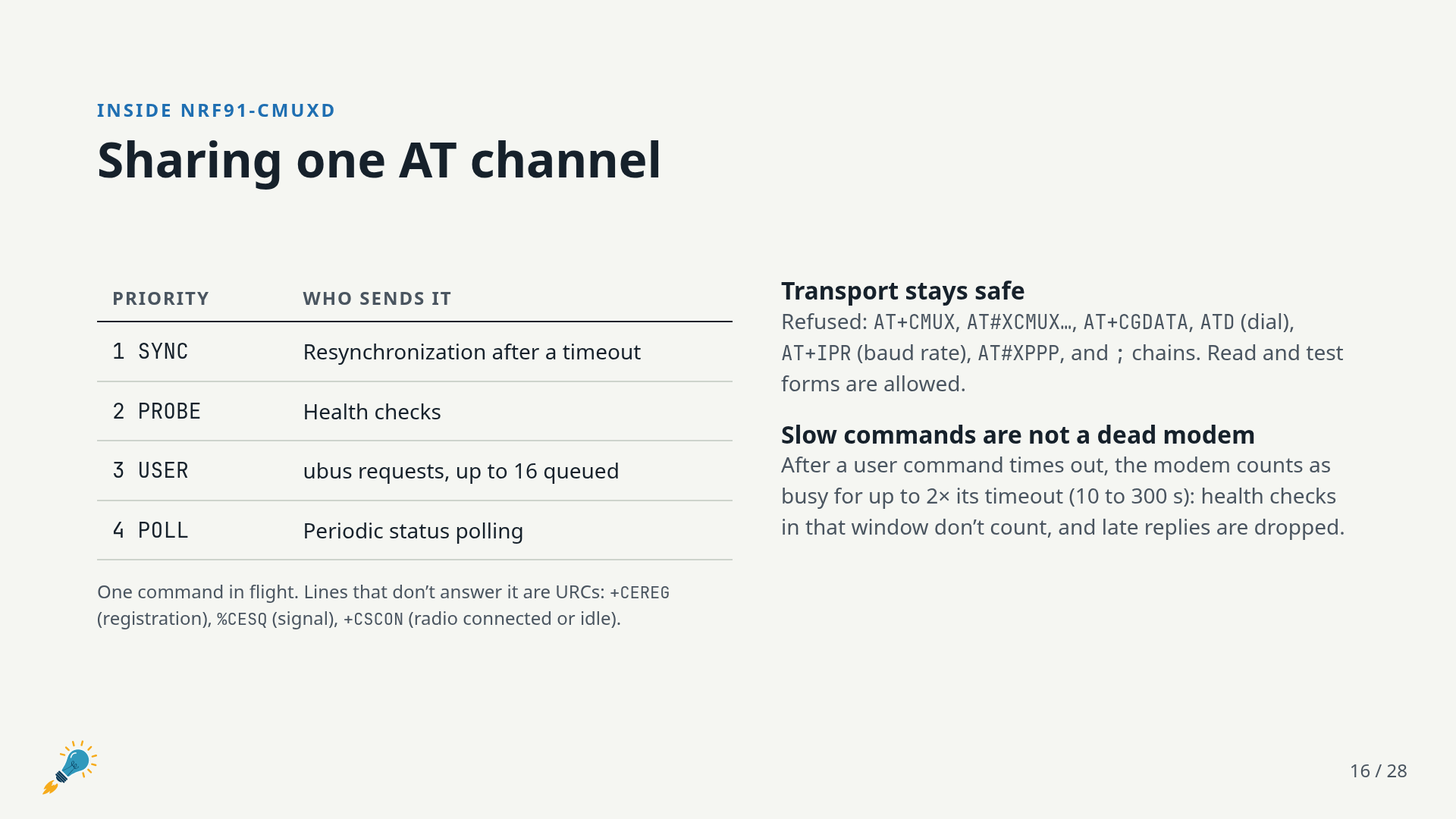
The modem can still only handle one AT command at a time, while the router might have plenty going on. So the AT channel is a priority queue: resync after a timeout first, then health checks, then requests from users and LuCI, then periodic polling. A slow command, like a network scan, doesn’t get mistaken for a dead modem. Commands that would break the transport (AT+CMUX, AT+CGDATA, AT+IPR and friends) are refused outright.
All of it is exposed over ubus, so LuCI, the shell and your own scripts see the same data:
ubus call nrf91 status         # cached modem and link status (JSON)
nrf91-at 'AT+CEREG?'           # one AT command
ubus call nrf91 reset_modem    # AT#XRESET; the link reconnects on its own
Failover with mwan3
Plug in an Ethernet WAN and both uplinks stay up. The wired one is preferred, and nrf91-mwan3 configures mwan3 to move IPv4 traffic to the cellular link whenever the wired WAN stops reaching the internet, even if its cable is still plugged in.
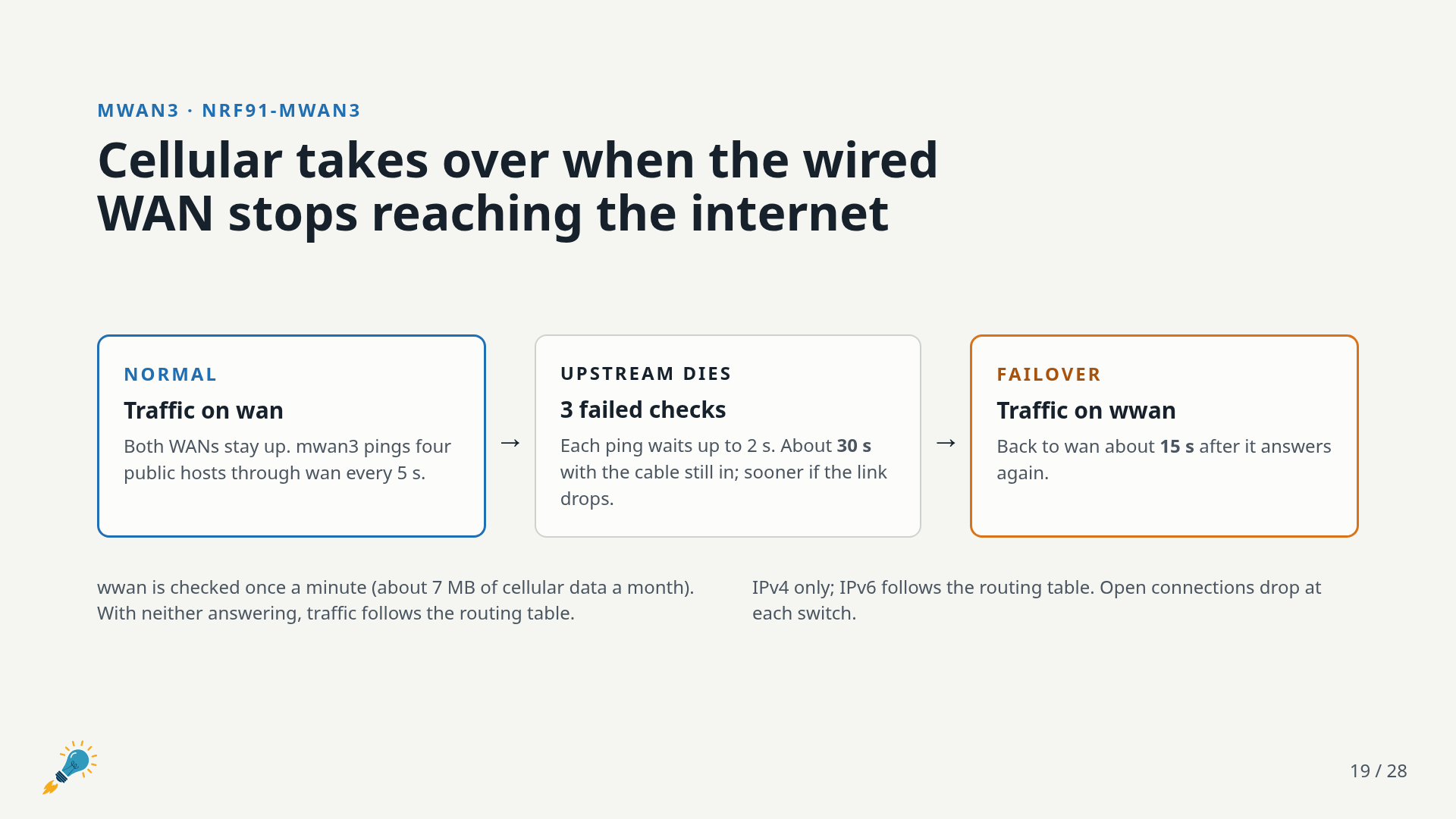
mwan3 pings a few public hosts through wan every 5 seconds. Three failures, about 30 seconds, move traffic to wwan, and it switches back about 15 seconds after wan recovers. Pulling the cable is detected faster because the physical link goes down. The cellular side is only checked once a minute to keep data usage down (about 7 MB a month).
SIMs and APNs
In most cases you don’t need to set anything. The modem uses whatever PDP context the network hands it. I used a Hologram SIM: plugged it in and it just worked. If your provider needs an APN:
uci set network.wwan.apn='your.apn'
uci commit network && ifup wwan
Speed, and why I wish I had flow control
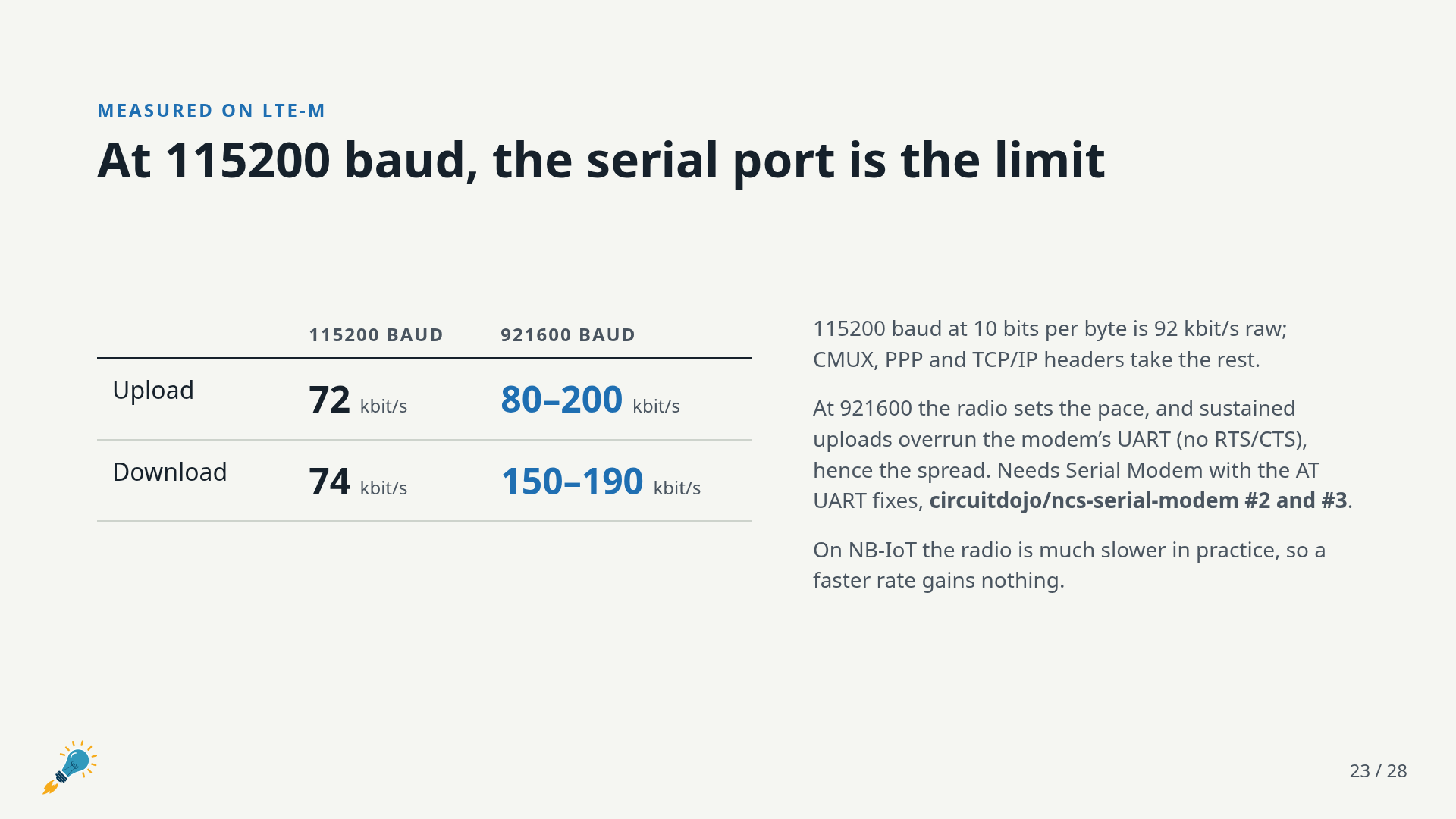
At 115200 baud the serial port is the bottleneck: 10 bits per byte is 92 kbit/s raw, and CMUX, PPP and TCP/IP headers take the rest. Bump it to 921600 with option ipr_baud and the radio sets the pace instead.
| 115200 | 921600 | |
|---|---|---|
| upload | 72 kbit/s | 80–200 kbit/s |
| download | 74 kbit/s | 150–190 kbit/s |
The spread at 921600 comes from flow control, or rather the lack of it. The Feather’s USB UART bridge has no RTS/CTS, so during a sustained upload the router can’t be told to slow down and it overruns the nRF9151’s UART. I never thought I’d say I wish I had added flow control to the Feather, since AT commands hardly need the bandwidth. But here we are.
CMUX, PPP and TCP recover the dropped frames, as long as the modem keeps receiving. Stock firmware could stop receiving for good after the first overruns. The fixes for that are in our fork of Serial Modem, circuitdojo/ncs-serial-modem (PRs #2 and #3), along with patches to the nRF UARTE driver that are applied with west patch apply. On NB-IoT the radio is slower than 115200 anyway, so the faster rate gains nothing there.
Things that bit me along the way
Kernel panics in n_gsm. Tearing down the multiplexer while pppd still had the PPP channel open could re-arm a transmit timer after cleanup had stopped it. The timer then fired on freed memory and took down the kernel. kmod-n-gsm carries a small patch that stops queueing frames once teardown begins. The bug is still in Linux 6.12.94 and mainline. I’m still deciding whether to send it upstream; for now it lives in the package, and the QEMU tests kill the daemon with PPP up to catch any regression.
Bootloader chatter on the AT UART. After AT#XRESET, both bootloaders (B0 and MCUboot) printed their boot messages on the same UART the Serial Modem uses for AT. That garbage confused initialization, and worse, a host that kept transmitting across the reset could leave the UART receiver in a state where the application never got any data. The fork now moves both bootloaders’ consoles off the AT UART, and resets recover within about half a second.
Hang-up on close. Closing a CMUX channel with HUPCL set drops DTR and waits on a modem status exchange, which deadlocks in the kernel if the mux is going away at the same time. nrf91-cmuxd clears it and stops PPP before closing the multiplexer.
No CMUX keepalive. Zephyr’s CMUX answers TEST frames with “not supported”, which n_gsm treats as a dead link. The AT health check does that job instead.
Testing without the router
Most of the iteration happened in QEMU, not on the travel router. tools/qemu-test.sh boots an x86_64 build of the same OpenWrt release against fake_modem.py, a simulated Serial Modem that speaks AT, Zephyr-style CMUX and a minimal PPP. It covers link up, ping through PPP, a hung and rebooted modem, APN changes, concurrent clients, clean shutdown and more. CI runs it on every pull request and every push to master.
When I want the real thing, tools/qemu-usb.sh passes the Feather’s whole USB device into the VM, and it can hand the board back to the host for flashing without rebooting the VM. That made it easy to test edge cases like yanking the cable, without the router on the bench at all.
Try it
On the modem side, build Serial Modem from our fork with the PPP and CMUX configs. You can do this from the CLI or with the extra config files setting in Zephyr Tools:
Run it from the fork’s app folder, after applying the UARTE driver patches once per workspace:
west patch apply
cd ncs-serial-modem/app
west build -p -b circuitdojo_feather_nrf9151/nrf9151/ns -- -DEXTRA_CONF_FILE="ppp.conf;cmux.conf"
west flash
On the router side, scripts/build.sh fetches the official OpenWrt SDK and ImageBuilder, builds the five packages, and produces a sysupgrade image plus .apk files you can install on an existing 25.12.5 router:
scripts/build.sh
scp out/25.12.5/ramips-mt76x8/openwrt-25.12.5-nrf91-ramips-mt76x8-glinet_gl-mt300n-v2-squashfs-sysupgrade.bin root@192.168.1.1:/tmp/
Then flash it on the router:
sysupgrade -n /tmp/openwrt-25.12.5-nrf91-ramips-mt76x8-glinet_gl-mt300n-v2-squashfs-sysupgrade.bin
You can also upload that image through LuCI (System → Backup / Flash Firmware), or install the packages on an existing router with apk add --allow-untrusted ./*.apk. Plug in the Feather, and wwan comes up on its own using the network’s APN. Network → Cellular shows the link, the serial port, the operator and band, signal and the modem’s identity, with buttons to restart the link or reset the modem.
The OpenWrt packages, build scripts and tests are in the openwrt-nrf9151-gateway repository.
What’s next
This little router still has plenty of free memory, so the next step is adding the OpenThread Border Router. Then the gateway idea gets interesting: instead of putting an nRF9151 and a SIM in every device, a mesh of low-power nodes can share one cellular uplink. Wi-Fi HaLow is another network I’d like to add.
If you build one of these, I’d love to hear what you hook up to it.