
Zephyr 101 - Data Usage Optimizations for Cellular IoT
How to cut cellular data usage and power draw by more than half on the nRF9151 Feather.
- Always-open DTLS socket + aggressive PSM vs. reconnecting every cycle
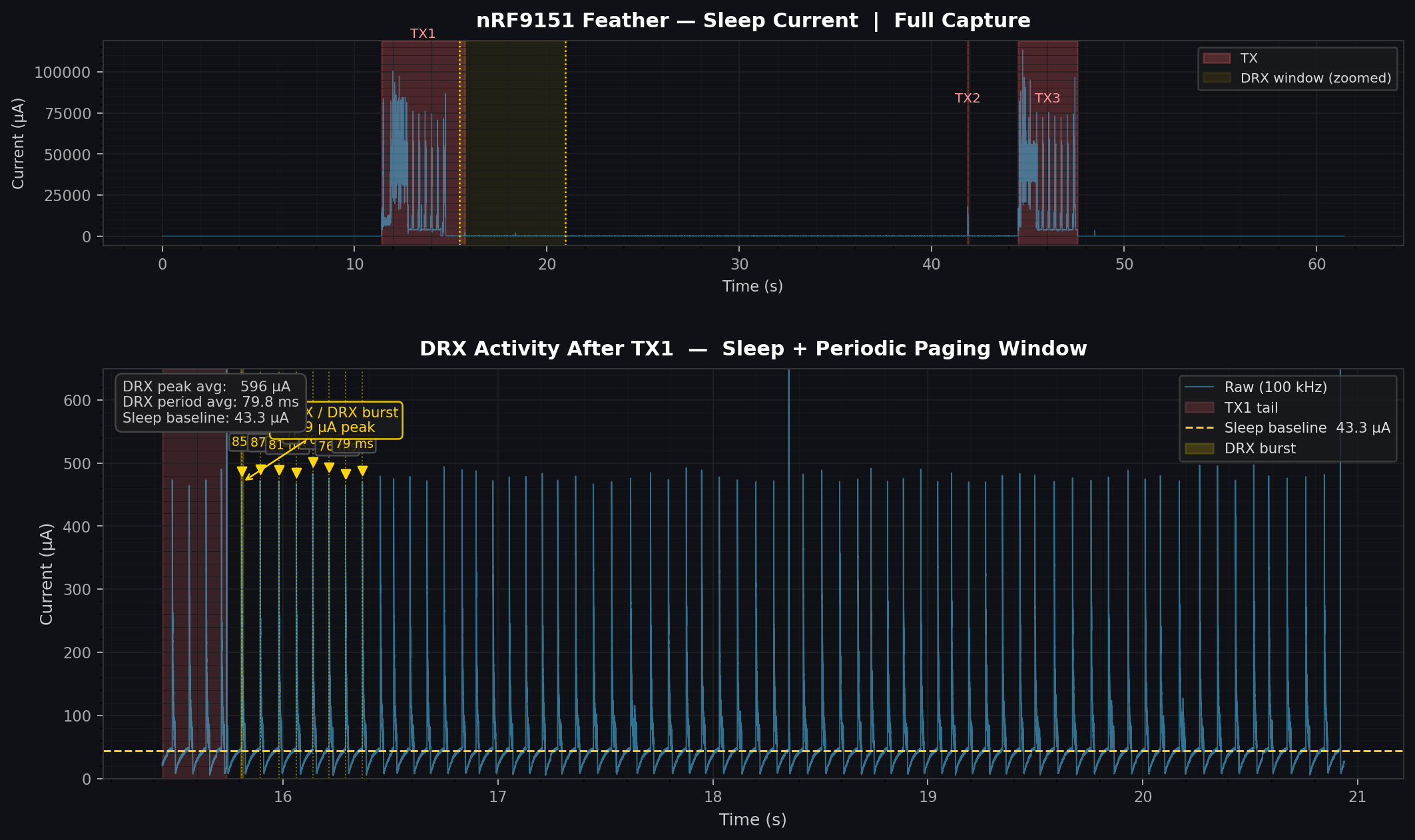
- Disabling eDRX to eliminate mystery 500 µA pulses
- Peripheral teardown order that gets you to ~5 µA active sleep
- Real measurements: from 898 µA average down to 132 µA, ~13 days dark autonomy on a 250 F supercap
Every cellular IoT deployment eventually runs into the same two problems at once: data costs money, and batteries (or supercaps) are finite. This session walks through both problems together using a real lion_sleep application running on the nRF9151 Feather — connected to a solar-charged 250 F supercap mounted in a garden — and shows what happens when you measure everything instead of guess.
The hardware setup
The test platform is a nRF9151 Feather paired with a Voltaic Systems solar harvesting board — a compact 2×2“ panel with onboard charging circuitry feeding a 250 F supercap (HyCap VPC 3.8 V, VEL13353R8257G).
The usable energy window runs from 3.6 V down to 3.0 V, which works out to about 42 mAh / 150 C of practical storage. The panel puts out roughly 0.3 W, which means any average current draw under about 200 µA is net-positive in reasonable sunlight. Everything above that is slowly draining the cap.
The nRF9151 is the A1A variant — NTN capable, so it can connect to satellite networks with the right antenna and service, though that’s a topic for a future session.
The application: lion_sleep
The firmware is a straightforward low-power loop built on Lion IoT — a CoAP/DTLS backend designed for exactly this kind of always-connected, low-power deployment:
Boot
 ├─ LittleFS init (NOR flash)
 ├─ Settings load (persisted PSK, config)
 ├─ Wait for LTE
 ├─ Connect to Lion IoT (DTLS bootstrap + CoAP)
 └─ Loop forever:
     1. lion_client_reregister_observations()
     2. Wait for config shadow response
     3. Read STS40 temperature
     4. Read modem RSRP + battery voltage
     5. Push telemetry (wait for ACK)
     6. Report config state
     7. Disable peripherals (NOR, UART, BUCK2)
     8. k_sleep(telemetry_interval_s)    ← default 600 s
     9. Resume peripherals
    10. goto 1
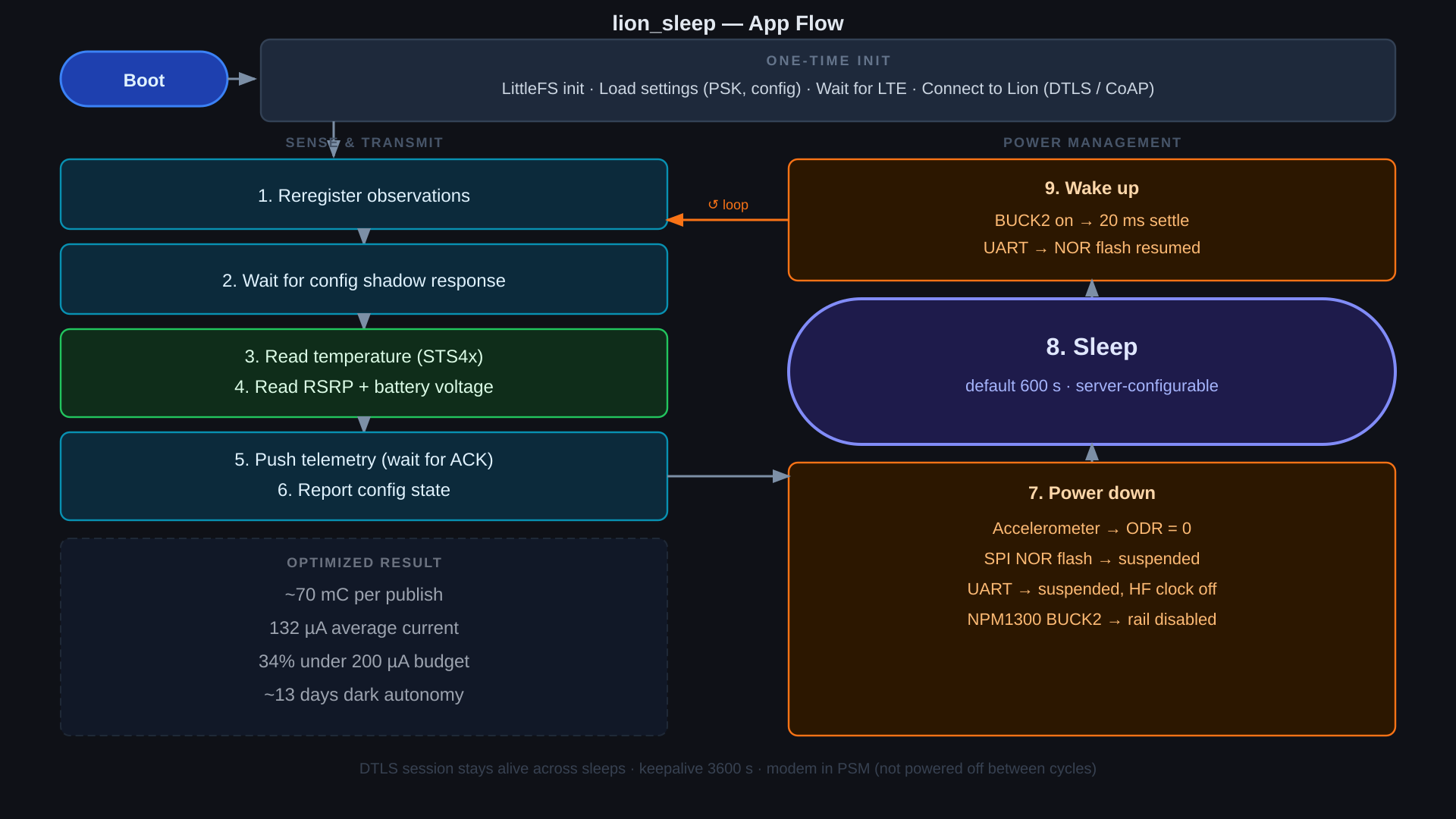
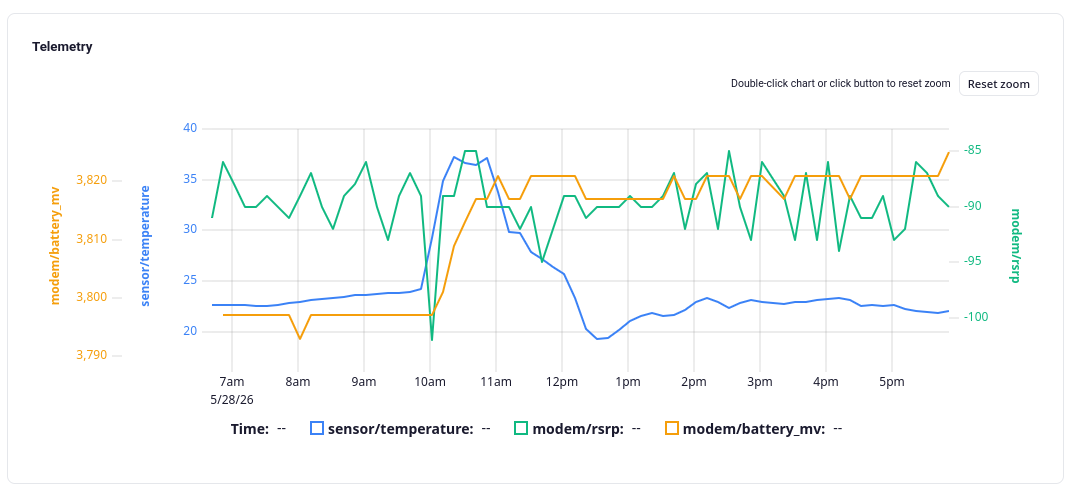
The device sends three values every cycle: RSRP (signal quality), temperature from the onboard STS40, and battery voltage via the modem ADC. The telemetry interval is server-controlled — change it in the Lion dashboard and the device picks it up next cycle.
The core question: reconnect or stay connected?
Three strategies were tested, all at 10-minute publish intervals:
Strategy 1: Full teardown + reconnect every wake. Power off modem, sleep, wake, re-establish LTE, re-establish DTLS, send data. This sounds clean but burns a lot of energy and data on every cycle. The initial cold connect alone is around 530 mC, and even warm reconnects came out to ~150 mC per cycle, averaging ~898 µA — more than 4× over the 200 µA solar budget. Dark autonomy on the supercap: about 1.9 days.
Strategy 2: DTLS session cache. Keep the session cached on the server so reconnects skip the full handshake. Better, but still measurably more expensive than the alternative, and adds server complexity.
Strategy 3: Always-open socket + aggressive PSM. Never close the socket. Never disconnect. Configure PSM so the modem sleeps as aggressively as the network allows. On the Lion IoT server side, set a 24-hour context timeout — if a device goes silent for 24 hours, clean up its session. For everything else, the connection just stays open while the modem sleeps.
This is the winner. With this approach, each publish costs about 70 mC — averaging 132 µA, which is 34% under the 200 µA solar budget. Dark autonomy jumps to ~13.2 days. Data usage drops from ~17 kbits/hr down to under 5 kbits/hr.
The reason reconnecting is so expensive is that you’re paying for LTE re-attach, DTLS handshake, observation re-registration, and metadata exchange every single cycle. With the always-open approach you pay that cost once at boot and the modem handles the rest.
PSM configuration
Getting aggressive PSM actually granted by the network requires a bit of attention. Setting the TAU and RAT timers to all-zeros requests the shortest possible intervals. On Soracom (AT&T/T-Mobile backend) this worked immediately — the network granted it. Trying to request a specific value like 6 seconds often gets overridden by the carrier to 2–3 minutes, which is longer than the active window and causes the modem to stay awake the entire cycle.
The Kconfig side is straightforward:
# PSM
CONFIG_LTE_LC_PSM_MODULE=y
CONFIG_LTE_PSM_REQ=y
CONFIG_LTE_PSM_REQ_RAT="00000000"
Setting RAT to all-zeros is the key — it requests the shortest possible active time and lets the network grant aggressive sleep. eDRX is off by default, but if you want to be explicit about disabling it entirely:
CONFIG_LTE_LC_EDRX_MODULE=n
The eDRX trap
After the PSM work everything looked great — under 5 µA sleeping, about 80 mC per publish, clean current profile. Then during extra restart testing, after the third or fourth reconnect cycle, 500 µA pulses appeared every ~80 ms.
These pulses came from eDRX. eDRX is a paging optimization for always-on devices: the modem negotiates a listen window with the tower, sleeps between windows, and wakes briefly to check for downlink data. That’s useful if you’re waiting for a server push. It’s counterproductive if you’re doing a deep application-level sleep where the modem is already going to PSM — the eDRX wake cycles keep firing anyway until the modem firmware times out, which on short publish intervals means they stay active the entire time.
Removing the CONFIG_LTE_EDRX_REQ=y entry (eDRX is off by default) eliminated the pulses immediately.
Peripheral teardown
Getting to ~5 µA active sleep on the nRF9151 Feather requires suspending everything that’s still drawing current. The order matters:
void peripherals_suspend(void)
{
    gpio_pin_configure_dt(&sw0, GPIO_DISCONNECTED); /* avoid leakage on switch pin */
    nor_suspend();    /* W25Q128 → DPD via PM_DEVICE_ACTION_SUSPEND, saves ~6 µA */
    uart_suspend();   /* uart_rx_disable first, then PM_DEVICE_ACTION_SUSPEND */
    pmic_suspend();   /* BUCK2 pulldown + clear enable → RP2040 off */
}

void peripherals_resume(void)
{
    pmic_resume();    /* BUCK2 re-enable */
    k_msleep(20);     /* let rail settle before driving UART/NOR pins */
    uart_resume();
    nor_resume();
}
In the main loop:
peripherals_suspend();
k_sem_take(&sleep_sem, K_SECONDS(telemetry_interval_s));
peripherals_resume();
BUCK2 on the nPM1300 powers the RP2040, which is your USB-to-UART bridge and debugger. Leaving it on costs current you don’t need in sleep. The regulator framework has a refcount issue on this part (see the chasing microamps post for the full story) — the workaround is to write the MFD registers directly.
On resume, bring BUCK2 up first, wait 20 ms for the rail to settle, then re-enable UART and NOR. If you invert that order the UART comes up before its supply is stable and you get garbage on the console.
If you’re doing OTA during a cycle, skip the NOR suspend — the OTA process writes to flash and needs the peripheral active.
Data efficiency: what else saves bytes
Beyond the socket strategy, a few firmware-level choices compound the savings:
- Config shadow: only send the config report when it has changed (
config_dirtyflag). The server diff check on wake uses a tiny CoAP payload and returns a 2.03 Valid if nothing changed. - Device metadata (firmware version, hardware type): sent once at boot only, not every cycle.
- Observations: re-registered on every wake to refresh the server’s NAT binding, but the registration payload is small and the round-trip confirms you have a live path before you push telemetry.
- Avoid unnecessary OTA: an OTA download is expensive in both data and energy. Don’t schedule them frequently if you’re on a tight budget.
The bonus: free irradiance data
One side effect of logging supercap voltage every cycle: you can see exactly when the sun hits the panel. In the test deployment, voltage jumps sharply to 3.8 V around 10 AM and the rate of rise through the morning gives a rough sense of cloud cover. It’s a crude ambient light sensor for free, as long as you’re already logging battery voltage.
Numbers summary
| Scenario | Per-cycle charge | Avg current | Dark autonomy (250 F cap) |
|---|---|---|---|
| Cold connect (one-time) | ~530 mC | — | — |
| Reconnect every cycle | ~150 mC | ~898 µA | ~1.9 days |
| PSM/eDRX wake (before fix) | ~146 mC | ~259 µA | ~6.7 days |
| Always-open PSM, no eDRX | ~70 mC | ~132 µA | ~13.2 days |
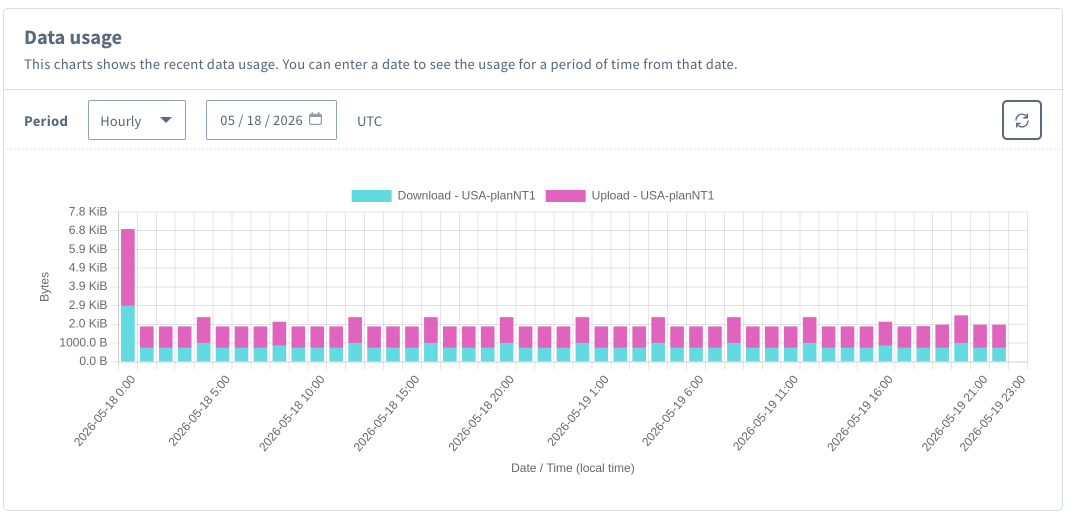
Data usage followed the same arc: ~17 kbits/hr with full reconnects down to under 5 kbits/hr with the optimized approach.
Reconnect scenario (Soracom hourly, ~15–20 KiB/hr):
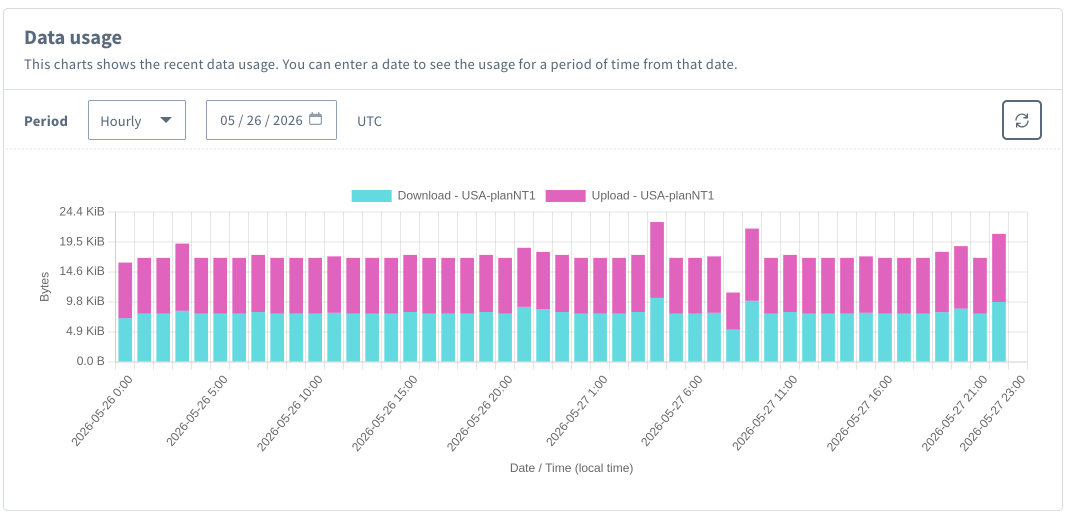
Optimized PSM scenario (same SIM plan, ~1–2 KiB/hr):
Try it
The lion_sleep sample lives in the lion-client repository (soon to be released) and targets the nRF9151 Feather. The PSM and eDRX Kconfig knobs above apply broadly to any nRF91-based project, but the peripheral teardown — particularly the BUCK2 disable — is specific to the nRF9151 Feather. See the chasing microamps post for the full details on why the regulator framework won’t do it and how to drive the nPM1300 MFD registers directly.
Sign up at lioniot.dev to get notified when Lion goes public!
Questions or results from your own measurements? Post them on community.circuitdojo.com.