
Zephyr 101 - ZMS: Zephyr Memory Storage
ZMS is Zephyr’s write-balanced key-value store, and the successor to NVS.
- Two ZMS instances on the Feather’s W25Q128 NOR: one for settings, one for a routing table
- Sizing sectors from your largest record, and what the lookup cache actually stores
- Why a cache collision can cost seconds, and the small RAM index that keeps misses off flash
- Measured against LittleFS at 200 records: 17 ms vs 342 ms per insert, 2.3 ms vs 205 ms per hit, 45 µs vs 79 ms per miss
Most of the time, settings in Zephyr means a handful of values: a device ID, a few config options, maybe a boot counter. Any backend will do. But I recently needed something different: hundreds of records that change constantly, get looked up on every packet, and still have to survive a reset. My first version used LittleFS, and it was slow. Painfully slow. So I moved it to ZMS (Zephyr Memory Storage), and every operation got faster by at least 20 times.
This post is about ZMS: what it is, how to set it up on the nRF9151 Feather’s external flash, how its lookup cache works under the hood, and the few things that bit me along the way.
The application
The project is a Reticulum LoRa gateway running on the nRF9151 Feather, ret_lora_gateway in our Zephyr Reticulum client. LoRa nodes talk to it through an SX1262, and it connects out over LTE to a stock rnsd hub.
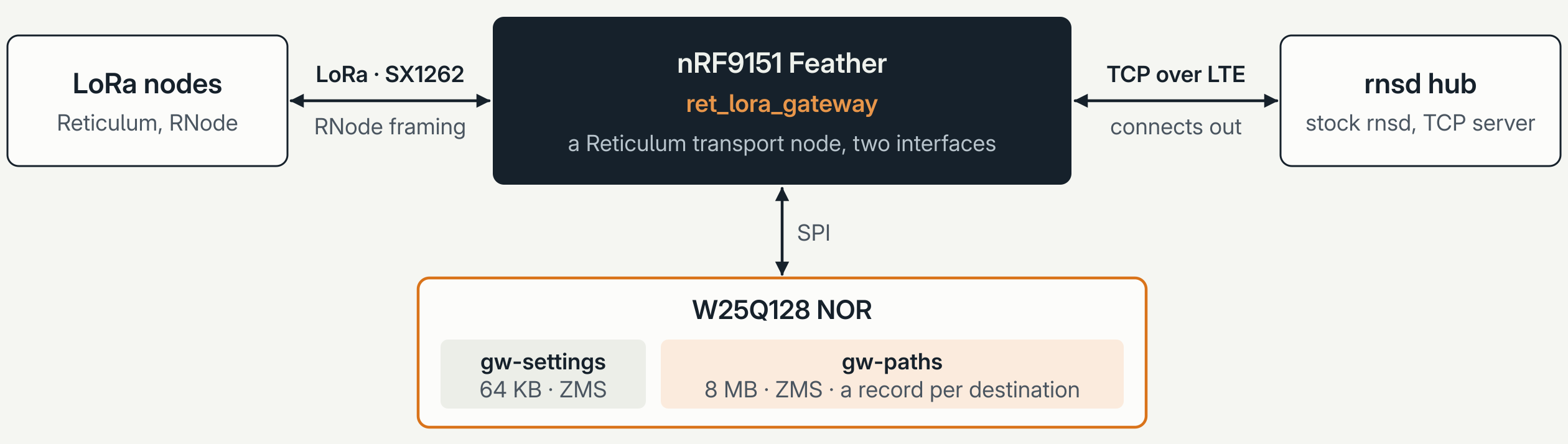
To route traffic, the gateway keeps a path for every destination it has heard announce: the destination’s 16-byte hash, the next hop, the hop count, which interface it came from (LoRa or the uplink), some housekeeping, and the announce itself (up to 500 bytes). The largest record comes out at 668 bytes.
That workload is hard on storage:
- Lots of records. Up to 512 by default.
- Lots of lookups, many of them for destinations the gateway has never heard of.
- Constant rewrites, every time a new announce arrives.
What ZMS is
ZMS is a key-value store, not a filesystem. There are no names, no directories, and no open or close. You get zms_write(), zms_read() and zms_delete() on 32-bit IDs. It’s the successor to NVS, and it’s also a backend for Zephyr’s settings subsystem (CONFIG_SETTINGS_ZMS).
Under the hood, it’s a circular log:
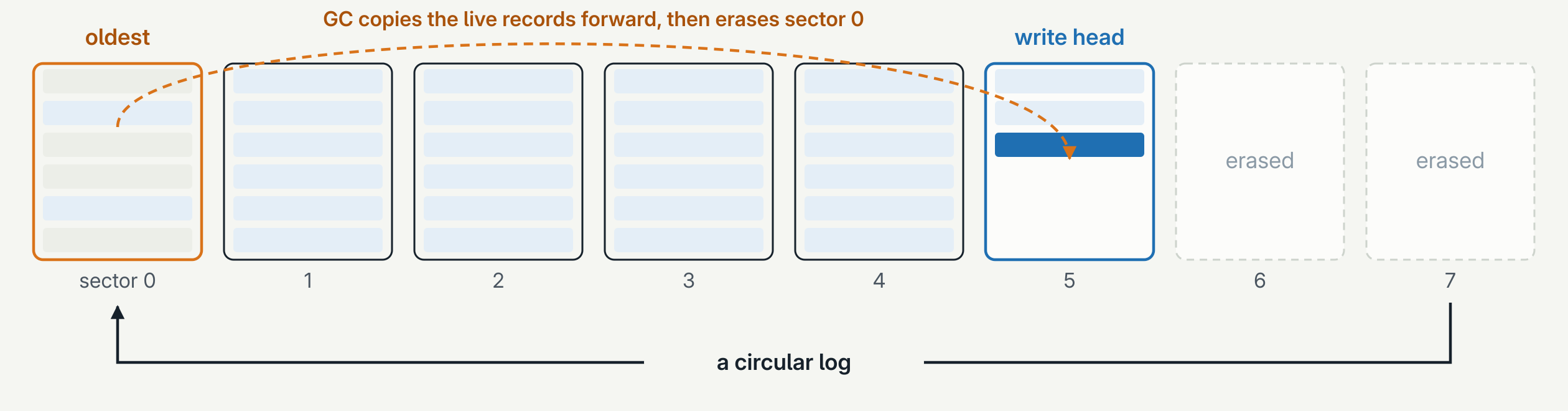
- Every write appends. Overwriting an ID just writes a newer copy at the head of the log. The newest copy wins.
- Garbage collection is sector by sector. When ZMS needs a fresh sector, it copies the live records out of the oldest one and erases it.
- Wear spreads evenly. Writes walk through every sector in turn, so no page gets hammered.
Each record starts with a 16-byte allocation table entry (ATE):
crc8 (1) | cycle_cnt (1) | len (2) | id (4) | offset (4) | data_crc (4)
Values grow from the start of a sector and ATEs grow from the end; the sector is full when they meet. A few details make ZMS nice to work with:
- Small values live in the ATE. A value of 8 bytes or less takes the place of
offsetanddata_crc. One write, no separate data. - The cycle counter tells stale entries from current ones without an erase. That’s what lets ZMS run on memories that don’t need erasing, like RRAM and MRAM.
data_crccovers the value when you enableCONFIG_ZMS_DATA_CRC.
Setting it up
The Kconfig splits into two halves. The board-specific half turns on the Feather’s external W25Q128 NOR:
# boards/circuitdojo_feather_nrf9151_ns.conf
CONFIG_SPI=y
CONFIG_SPI_NOR=y
CONFIG_SPI_NOR_FLASH_LAYOUT_PAGE_SIZE=4096
CONFIG_SPI_NOR_SFDP_RUNTIME=y
The rest is platform agnostic, so it lives in prj.conf. That way the same store, and its benchmark, also run on native_sim’s simulated flash:
# prj.conf
CONFIG_FLASH=y
CONFIG_FLASH_MAP=y
CONFIG_FLASH_PAGE_LAYOUT=y
CONFIG_ZMS=y
CONFIG_ZMS_DATA_CRC=y
CONFIG_ZMS_LOOKUP_CACHE=y
CONFIG_ZMS_LOOKUP_CACHE_MANUAL=y
CONFIG_SETTINGS=y
CONFIG_SETTINGS_ZMS=y
CONFIG_ZMS_LOOKUP_CACHE_MANUAL means I hand ZMS the cache buffer myself, sized per instance, instead of using a global size.
Two partitions, two instances
The overlay replaces the board’s default LittleFS partition with two ZMS partitions:
/delete-node/ &lfs;
/delete-node/ &lfs_partition;

/ {
	chosen {
		zephyr,settings-partition = &gw_settings_partition;
	};
};

&w25q128jv {
	partitions {
		gw_settings_partition: partition@0 {
			label = "gw-settings";
			reg = <0x00000000 0x00010000>;	/* 64 KB */
		};

		gw_paths_partition: partition@10000 {
			label = "gw-paths";
			reg = <0x00010000 0x00800000>;	/* 8 MB */
		};
	};
};
The first is the usual settings backend: the gateway’s identity and a boot counter, the kind of config that has to survive a power cycle. The second is a raw ZMS instance that the gateway drives directly, with one record per destination.
Why not keep them together?
- Record IDs would collide. Path IDs come from destination hashes, and could land on the IDs the settings subsystem uses.
- Path churn shouldn’t touch the identity. Garbage collection on a busy routing table would keep rewriting the settings along with it.
- The paths can be wiped on their own.
- Each is sized for its own job.
Heads up: flashing this repartitions the external flash, so anything another app kept in LittleFS there is gone.
Mounting
Mounting the paths partition takes three steps.
1. Point ZMS at the partition:
static struct zms_fs fs;

fs.flash_device = PARTITION_DEVICE(gw_paths_partition);
fs.offset = PARTITION_OFFSET(gw_paths_partition);
err = flash_get_page_info_by_offs(fs.flash_device, fs.offset, &info);
2. Size the sectors from your largest record:
#define RECORD_MAX (sizeof(struct header) + sizeof(struct ret_transport_path_meta) + RET_MTU)

fs.sector_size = ROUND_UP(MAX(info.size, 2 * RECORD_MAX), info.size);
fs.sector_count = PARTITION_SIZE(gw_paths_partition) / fs.sector_size;
A sector should hold at least two of the largest record, rounded up to whole erase pages. Two 668-byte records round up to a single 4 KB erase page on the W25Q128, so the 8 MB partition has 2,048 sectors. With real records closer to 600 bytes, that’s about 6 records per sector.
Leave plenty of headroom. A ZMS that’s nearly full spends most of its time in garbage collection. I check at build time (a BUILD_ASSERT) and again at mount that the partition can hold twice the maximum number of records.
3. Set the lookup cache, then mount:
static uint64_t lookup_cache[CONFIG_RET_GATEWAY_ZMS_CACHE];	/* 1,024 entries */

err = zms_set_lookup_cache(&fs, lookup_cache, ARRAY_SIZE(lookup_cache));
if (!err) {
	err = zms_mount(&fs);
}
The order matters: zms_set_lookup_cache() returns -EBUSY once the instance is mounted. ZMS fills the cache itself while mounting.
How the lookup cache works
Without the cache, ZMS finds a record by walking its log backwards from the newest entry. On the NOR, that’s about 0.15 ms per entry, so a big partition takes hundreds of milliseconds or more. The cache is what makes ZMS fast.
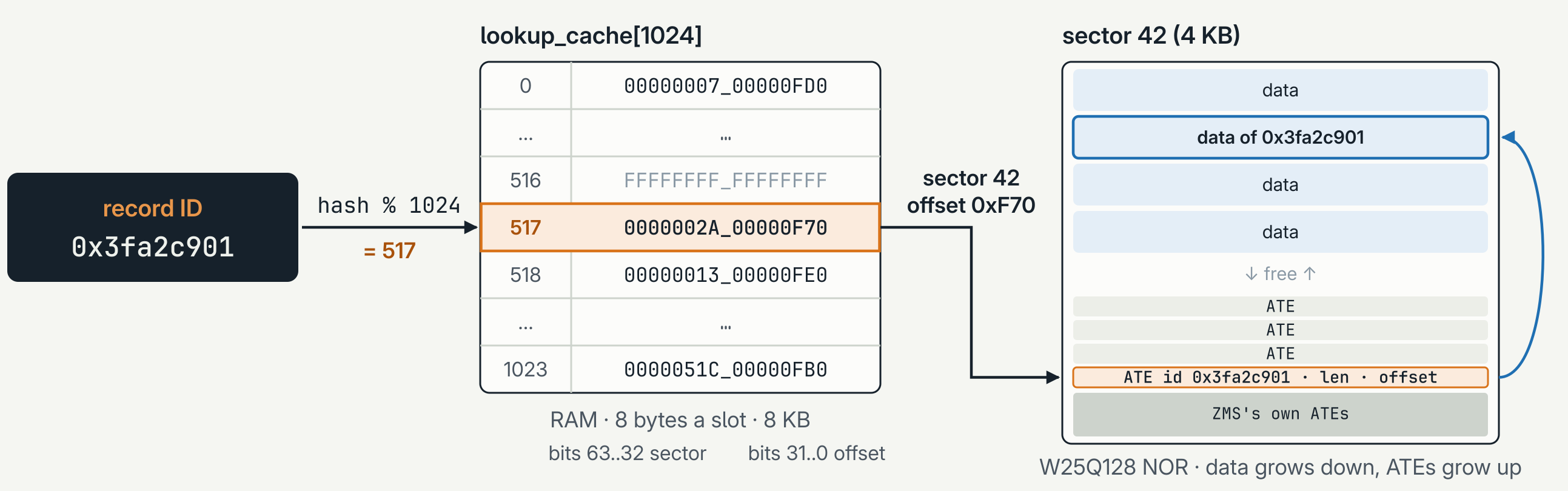
- A slot is
hash(id) % size, using a 32-bit integer mixing hash. The same ID always lands in the same slot. There are 2³² possible IDs and only 1,024 slots, so many IDs share each one. - Each slot holds a 64-bit flash address for one entry: the sector number in bits 63..32, and the byte offset within that sector in bits 31..0.
- 1,024 slots × 8 bytes = 8 KB of RAM.
Here’s a lookup for a record with ID 0x3fa2c901:
hash(0x3fa2c901) % 1024gives slot 517.lookup_cache[517]holds0x0000002A_00000F70: sector 42, offset0xF70.- ZMS reads the 16-byte ATE at that address. Then one of three things happens:
- Hit. The ATE’s ID is
0x3fa2c901. That’s the newest copy, found in one flash read. - Collision. The ATE belongs to another ID that also hashes to 517. ZMS walks back through the log from the newest entry until it finds ours, all the way around if it has to.
- Empty slot. If the slot is all ones, nothing stored hashes to 517.
zms_read()returns-ENOENTwithout touching flash.
- Hit. The ATE’s ID is
The collision case is the one to watch. On the full 8 MB partition, that’s 2,048 sectors × (about 6 records plus a few of ZMS’s own ATEs), or around 18,000 ATEs. At 0.15 ms each, one unlucky read can take 2 to 3 seconds. The rule of thumb: give the cache about twice as many slots as the records you store.
Keeping misses off flash
Even with a well-sized cache, a gateway asks about destinations it doesn’t have all the time, and any of those lookups can hit a collision. So I added a small index of my own in RAM:
struct entry {
	uint32_t id;	/* the ZMS record ID */
	uint32_t tag;	/* who owns that ID */
};

static struct entry entries[CONFIG_RET_GATEWAY_STORE_MAX_PATHS];	/* 512 × 8 B = 4 KB */
It doesn’t hold the paths themselves, only which record IDs are in flash and which destination owns each one. It’s sorted by ID and binary searched. The record ID comes from bytes 0..3 of the destination hash, and the tag from bytes 4..7.
- A miss never reaches ZMS. If neither of a destination’s IDs is in the index, the answer is
-ENOENTin about 45 µs. - Writes don’t need a read first. The index already knows whether an ID is free, ours, or someone else’s.
- Collisions are handled. 32 bits of a hash are cheap to grind, so a destination whose first ID is taken moves to a second one (bytes 8..11). If both are taken, the newcomer isn’t stored rather than replacing someone else’s path. Every read still checks the full 16-byte hash in the record.
The index and ZMS’s lookup cache do different jobs. The index decides whether to read; the cache decides where. Together they cost 12 KB of RAM.
Things that bit me
zms_iter_next() is quadratic. The index gets rebuilt at boot by walking every record. zms_iter_next() checks for a newer copy of each entry it returns, so a full walk is O(n²). zms_iter_next_all() returns every entry, stale ones included, in one linear pass, and you sort out deleted and superseded IDs yourself. The iterator is new in Zephyr v4.5, and NCS v3.5 backports it.
Partial reads skip the data CRC. The CRC covers the whole value, so ZMS only checks it when you read the whole thing. If your buffer comes back full, check zms_get_data_length() to make sure you actually got the whole record.
0xFFFFFFFF is ZMS’s. ZMS uses that ID for its own entries (sector headers, GC markers). If your IDs come from hashes, remap it.
Plan for bad records. If a record fails its CRC, retry once, then delete it. One corrupt record shouldn’t stop a boot.
ZMS vs LittleFS
The first version of the store kept one file per destination on LittleFS, under /lfs/tp/<destination hash>. I wrote a benchmark that drove both stores with the same workload (inserts, hits, misses, metadata updates, announce replacements and a full walk) and ran it on the Feather’s W25Q128 with 200 paths and 300-byte announces:
| ZMS | LittleFS | ||
|---|---|---|---|
| insert | 17 ms | 342 ms | 20× |
| hit | 2.3 ms | 205 ms | 89× |
| miss | 45 µs | 79 ms | ~1,750× |
| flash per path | ~600 B | 4.4 KB | 7× |
Boot was the most dramatic difference. LittleFS took 43 seconds to walk 200 paths. ZMS boots in 3.7 seconds with 1,000 stored. It also did about 8 times fewer erases for the same workload, and the ZMS store is 18 KB less code.
The flash-per-path number explains a lot of it:
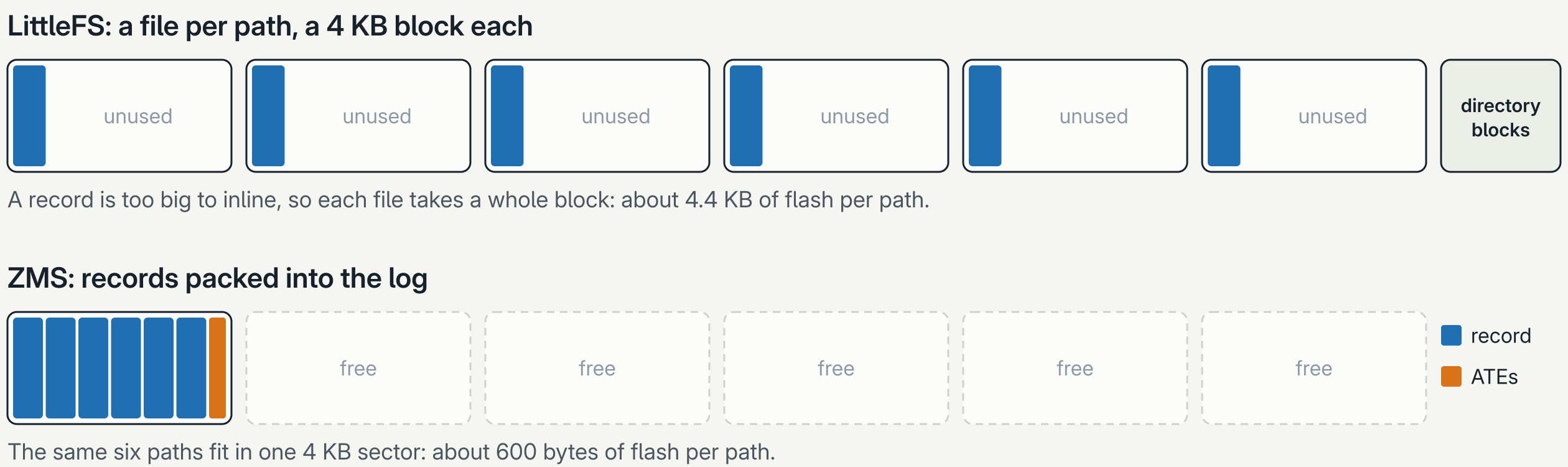
A path record is too big for LittleFS to inline, so every file takes a whole 4 KB block, and every lookup searches one large directory. ZMS just packs records into the log back to back.
With numbers like these, there was no reason to keep a second store to maintain, so the LittleFS version is gone from main. If you want to rerun the comparison, check out 6a256fa, where both stores build: add -DFILE_SUFFIX=lfs to get the LittleFS one.
When LittleFS is still the right choice
ZMS isn’t free. The lookup cache and my index add 12 KB of RAM: the benchmark build uses 28.9 KB on the Feather, against 16.6 KB with LittleFS. And it’s not a filesystem. If you want names and directories, values bigger than a sector, data you append to or read in pieces, or files you can pull off over a shell or USB, LittleFS is still the tool.
But for lots of small records that you look up by key, ZMS wins by a wide margin.
Try it
The store is src/store_zms.c, and the benchmark is in samples/ret_lora_gateway/bench. Run these from the repository root.
The benchmark runs on native_sim too, where the flash simulator also counts the bytes read and written and the erases:
west build -b native_sim samples/ret_lora_gateway/bench -d build/gw_bench --no-sysbuild
build/gw_bench/zephyr/zephyr.exe --flash=bench.bin
On the Feather, it gives real timings on the NOR, then reboots warm to time the boot. It erases both NOR partitions first, so back up anything you need:
west build -b circuitdojo_feather_nrf9151/nrf9151/ns samples/ret_lora_gateway/bench
west flash
Watch the console for BENCH DONE.
If you’re using NVS or LittleFS for a pile of small records today, give ZMS a try. Just size the cache, leave headroom in the partition, and use zms_iter_next_all() if you need to walk everything.